


Author- Chetan Kumar
What is specific about 2026? The search landscape has evolved. It’s no longer just about keywords; it’s about AI-driven search intent, hyper-local relevance, and building Experience, Expertise, Authoritativeness, and Trustworthiness (E-E-A-T). Your Google Business Profile (formerly Google My Business) is your digital storefront, often the only interaction a customer has with your business before making a decision.
At YoGrow Solutions Pvt Ltd, we understand that for businesses aiming to thrive, especially in competitive markets like the USA, mastering local SEO is non-negotiable. This guide isn’t just a list; it’s a strategic roadmap to dominance.
If you’re asking, “What is Google Business Profile?”—it is a free tool that allows you to influence how your business appears on Google Search and Maps. But in 2026, it’s more than that; it’s a dynamic conversion engine.
Maximum Visibility: Appear in the coveted “Local 3-Pack”—the top three results displayed for local searches.
Trust & Credibility: Verified profiles with reviews are significantly more trusted by consumers.
Direct Interaction: Customers can message, call, or book appointments directly from the search result.
Insights: Gain deep data on how customers find and interact with you.
Google Business Profile benefits go beyond simple listings. A well-optimized profile works for you 24/7, driving foot traffic and web clicks without constant ad spend.
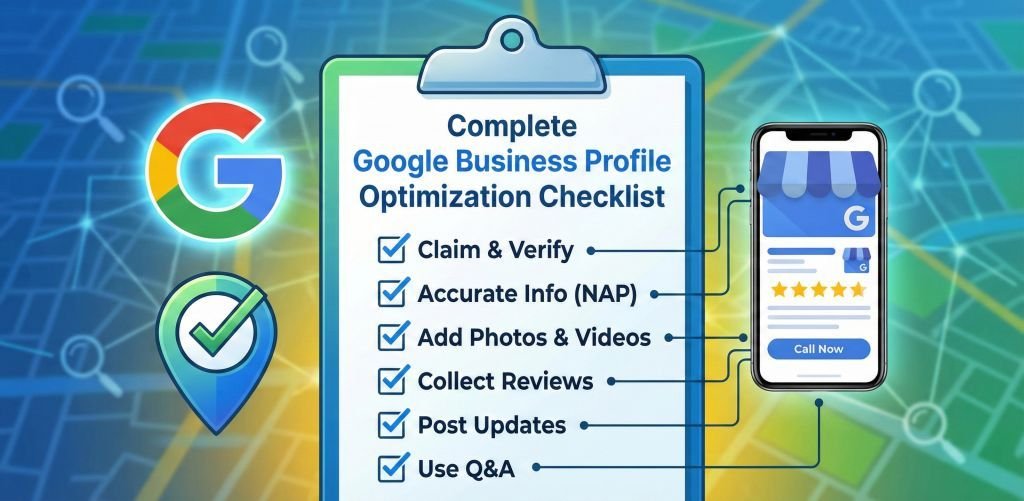
Ready to rank? Follow this Google Business Profile optimization checklist designed for 2026 standards.
Before you can rank, you must exist.
Claim or Create: Go to Google Maps or Business Profile Manager and find your business.
Standardize NAP: Ensure your Name, Address, and Phone number match exactly what is on your website. Discrepancies confuse Google’s AI.
Verify Immediately: Use the method Google provides (postcard, phone, video). Unverified listings are invisible.
How to set up Google Business Profile effectively means not skipping the basics.
Business Name: Use your real-world name. Do not stuff keywords here (e.g., “Best Pizza in NY”) unless it’s your legal name. That’s a fast track to suspension.
Categories: This is critical. Choose a primary category that best describes what you are, not just what you do.
Pro Tip: Use secondary categories to cover other services. If you are a “Marketing Agency” but also do “Web Design,” add it.
Description: Write a compelling, natural description. Include your primary keywords like “Google Business Profile optimization” early on. Explain what makes you unique.
YoGrow Tip: Mention your years of experience or unique methodology.
Attributes: Check off all relevant attributes (e.g., “Women-owned,” “Wheelchair accessible,” “Free Wi-Fi”). These help match you with specific AI search queries (e.g., “wheelchair accessible cafe near me”).
Images are a ranking factor. Listings with photos see 42% more requests for directions.
Profile Photo: Your logo, clear and centered.
Cover Photo: A high-quality shot of your team, storefront, or happy customers. This often dictates the first impression.
Google Business Profile photo size 2026:
Profile: 720 x 720 pixels (min 250 x 250).
Cover: 1024 x 576 pixels (16:9 ratio).
Regular Updates: Upload new photos weekly. Real, raw photos often outperform stock images because they prove E-E-A-T—real people doing real work.
Services: List your services and add descriptions. This helps Google associate your profile with specific search terms (e.g., “Google Business Profile SEO,” “Google Maps marketing strategy“).
Products: If you sell products, use the Product Editor. Include an image, description, price range, and a “Buy” or “Learn More” button. This often appears directly on the search result, acting as a mini-ad.
Location vs. Service Area: If you serve customers at your address (storefront), list the address. If you go to them (plumber, consultant), hide the address and define your “Service Areas” by city or zip code.
Google Business Profile service area vs location: Getting this wrong is a common error. Be precise. Don’t list areas you don’t actually serve.
Once the basics are done, it’s time to outperform the competition with advanced tactics.
Google Business Profile reviews importance cannot be overstated. They are the #1 factor for local conversions.
Manage Google Business Profile reviews proactively to mitigate damage from negative feedback.
Did you know anyone can ask—and answer—questions on your profile?
Seed Your Own Q&A: Don’t wait. Post common questions (“Do you offer free consultations?”) and answer them yourself.
Monitor: Watch for user questions and answer immediately. This is a prime spot to discuss Google Business Profile cost (it’s free!) or specific service details.
Treat your profile like a social feed.
Post Regularly: Weekly updates keep your profile “fresh,” a key ranking signal.
Google Business Profile posts ideas:
Even the best profiles hit snags.
Suspensions: If your listing disappears, don’t panic. Check Google’s guidelines. Common triggers include keyword stuffing in the name or using a P.O. Box. Google Business Profile suspension fix usually involves submitting a reinstatement form with proof of business (utility bill, business license).
Spam: Competitors using fake names? Use the “Suggest an edit” feature to report them (Google Business Profile spam fighting).
Duplicates: How to delete Google Business Profile duplicates involves contacting support to merge them, ensuring you don’t lose reviews.
Use the “Performance” tab to track:
Why choose YoGrow Solutions Pvt Ltd? We don’t just “do SEO”; we build growth engines.
Optimizing your profile is an ongoing process, not a one-time task. In 2026, the winners will be those who actively manage Google Business Profile assets, treating them as a core part of their digital identity.
Ready to dominate your local market?
Don’t leave your visibility to chance. Partner with the experts who know how to navigate the 2026 landscape.
Website: https://yogrowsolutions.com
Email: info@yogrowsolutions.com
Phone: +1 (571) 408-6124
Address: 418 BROADWAY, ALBANY, NY 12207
Yes, the tool itself is completely free. However, managing it effectively takes time and expertise.
We recommend at least once a week to signal activity to Google.
Yes! You can set up a profile as a “Service Area Business” and hide your home address.
Postcards can take up to 2 weeks. Video or phone verification is often instant.
It might be unverified, suspended, or simply lack the optimization needed to rank. Start with our checklist above!






Leave A Reply Now