



In the fast-paced digital world of 2026, most business owners feel like they are constantly falling behind the latest Google algorithm shift. You know SEO is important, but who has the time (or the massive budget) for a 50-page technical audit every month? The good news is that you don’t need to be a coding genius to understand your site’s health.
Many people ask, “Can I do my own SEO audit?” The answer is a resounding yes. In fact, if you follow a structured 15-minute SEO routine for small business, you can identify 80% of the issues that are holding back your rankings. This is based on what is the 80/20 rule in SEO auditing?—focusing on the most impactful 20% of tasks that drive 80% of your results.
In this DIY SEO audit guide, we will show you how do I check my own website SEO? effectively and efficiently.
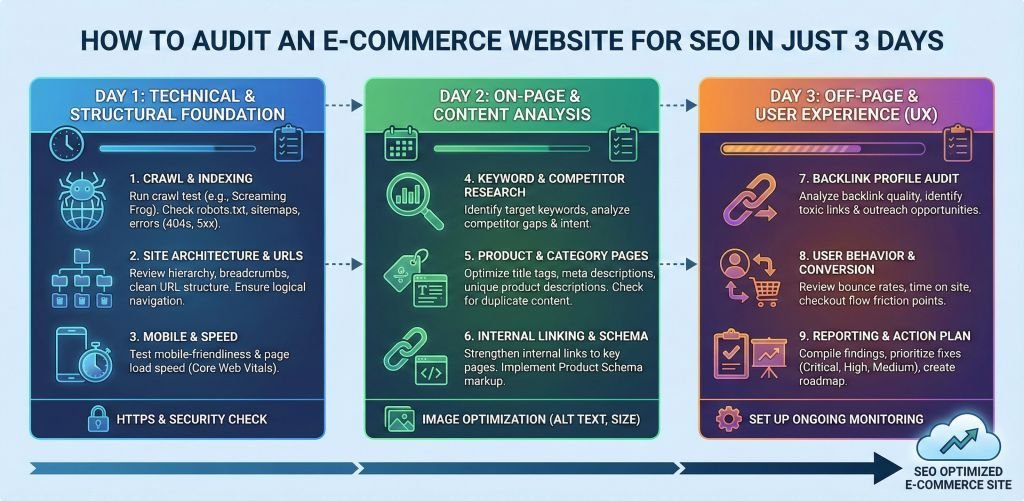
The first step in any step-by-step SEO health check is ensuring that Google can actually “see” your website. If your content isn’t being indexed, it doesn’t matter how good it is.
Open your Google Search Console (GSC). This is your most direct line of communication with Google. Navigate to the “Indexing” report to check your crawlability and indexing status. Look specifically for Google Search Console (GSC) errors that indicate pages are being blocked or are returning server errors.
Review your XML Sitemap health. Your sitemap should be clean, up-to-date, and submitted to GSC. If Google isn’t crawling new pages, your sitemap might be the culprit. Simultaneously, perform a quick Robots.txt optimization check. Ensure you aren’t accidentally “disallowing” your most important service pages or your entire site from search engines.
Google’s 2026 ranking factors rely heavily on “Experience.” If your site is slow or frustrating to use, you will lose positions to competitors who provide a smoother ride.
Use Google PageSpeed Insights to measure your Core Web Vitals (CWV). These metrics (LCP, FID, CLS) tell Google how fast your page loads and how stable it is while loading. If your site feels sluggish, it’s often due to unoptimized images or heavy scripts.
Run a quick mobile-friendliness test. With mobile-first indexing being the standard, your site must look and function perfectly on a smartphone. Check for overlapping text, buttons that are too small to click, or content that overflows the screen.
Now it’s time to look at the content itself. This is where most small businesses can find “low-hanging fruit” for quick ranking boosts.
Focus on Title tag optimization and Meta description clarity & CTR. Your title tag is the #1 on-page signal for Google, while your meta description is your primary tool for driving clicks. Are they keyword-rich? Do they have a clear call to action?
Check your H1-H3 tag hierarchy. Every page should have exactly ONE H1 tag that matches the primary topic. Subheadings (H2, H3) should be used to organize the content naturally, making it easy for both users and bots to skim.
Perform a rapid image alt text audit. Ensure your images have descriptive tags that help visually impaired users and provide context to search engines. While you’re at it, look for thin content identification. If a page has fewer than 300 words and provides no real value, consider beefing it up or deleting it to avoid “content rot.”
The final minutes of your audit should focus on the “glue” that holds your SEO together: links and technical data.
Check for broken links (404 errors) & redirect chains. Nothing kills user trust faster than a “Page Not Found” error. Use the Ubersuggest SEO Checker or SEO Optimer to quickly find these dead ends and point them to active pages.
Look for a keyword cannibalization check. This happens when two or more pages on your site are trying to rank for the exact same keyword, confusing Google. Finally, ensure you are using Schema markup (Structured data). This helps Google understand your business type (Local Business, Product, Review) and can earn you “Rich Snippets” in the search results.
As we move into 2026, many wonder, “Can ChatGPT do an SEO audit?” The answer is: yes, as an assistant. While AI cannot “crawl” your site with the same depth as technical tools, it is excellent for:
However, for a true technical deep dive, you still need professional tools.
To complete this free SEO audit for beginners, you should have these tools bookmarked:
1. Screaming Frog (Free mode): The gold standard for crawling up to 500 URLs and finding technical errors.
2. Ahrefs Site Audit Lite: Great for identifying health scores and backlink gaps.
3. SEMrush Site Health Score: Provides a clear percentage-based score of your site’s technical integrity.
4. Google Search Console: The absolute requirement for monitoring indexing and errors.
At YoGrow Solutions, we understand that a 15-minute audit is a great start, but true market dominance requires a deep-dive strategy. We act as your “Top Growth Partner” by taking these quick findings and turning them into a massive growth roadmap.
Our team specializes in local seo for small businesses, taking the burden of technical maintenance off your shoulders so you can focus on running your business. Whether it’s fixing complex Google Search Console (GSC) errors or optimizing for Core Web Vitals, we have the expertise to scale your presence in New York and beyond.
Read Our Popular Blogs:
What is “White Hat SEO” and Why Should You Care?
How to Dominate the ‘Near Me’ Search Results in 2026
SEO vs. Meta Ads: Which is Better for US Service Businesses?
best seo agency in new york
How often should you audit your SEO? We recommend doing this 15-minute “Quick Check” every month. However, a full, professional audit should be conducted quarterly or whenever you make major changes to your website.
Ready to stop guessing and start growing?
Contact YoGrow Solutions today for a comprehensive SEO Strategy that goes far beyond the 15-minute basics.






Leave A Reply Now